Tutorial: Report an Issue
Use this tutorial to report an issue with the Georgia Babies Can't Wait system from the Home page.
|
NOTE: This tutorial can only be performed when you are logged out of the Georgia Babies Can't Wait system. |

Complete the following steps to perform this tutorial:
-
If you are currently logged into the Georgia Babies Can't Wait system, select the Logout link at the top left of the page. You are logged out of the system and the Home page displays.
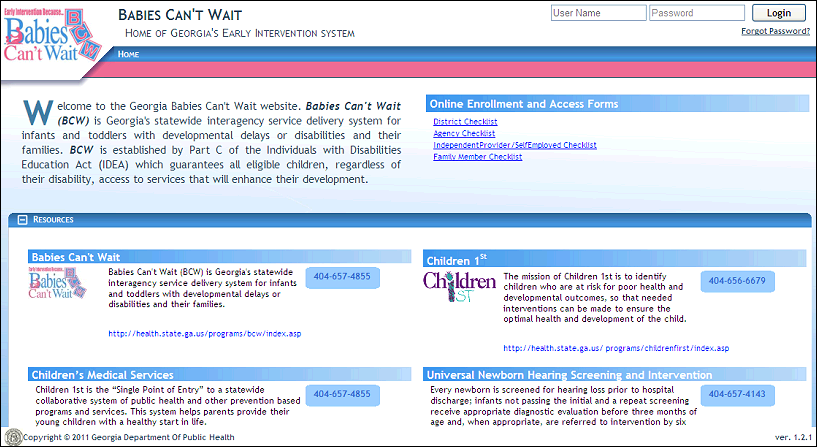
Home page (default view)
-
In the Babies Can't Wait for the Family section, select the Report Issue link. The Report Issue page displays in a new browser window.
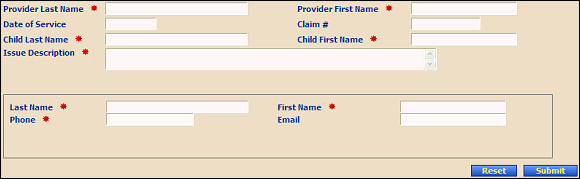
Report Issue page (default view)
-
Enter information in the following controls:
In Provider Last Name, enter the last name of the person. At least two characters must be entered. You can enter up to 40 characters as necessary.
In Provider First Name, enter the first name of the person. At least two characters must be entered. You can enter up to 25 characters as necessary.
In Service Date, enter the month, day, and year on which the service was administered. For more information about entering dates, see the Calendar Controls topic.
In Claim #, enter the specific claim identification number.
In Child Last Name, enter the last name of the person. At least two characters must be entered. You can enter up to 40 characters as necessary.
In Child First Name, enter the first name of the person. At least two characters must be entered. You can enter up to 25 characters as necessary.
In Issue Description, enter the issue being submitted.
In Last Name, enter the last name of the person. At least two characters must be entered. You can enter up to 40 characters as necessary.
In First Name, enter the first name of the person. At least two characters must be entered. You can enter up to 25 characters as necessary.
In Phone, enter the telephone number at which the person can be contacted.
In Email, enter the electronic mail address for the person. Email addresses must be entered in the format of: name@xxx.zzz. At least 10 characters must be entered, and you can enter up to 50 characters as necessary.
-
Click Submit to save the issue to the database.
Version 1.6