Tutorial: View or Update Physician Health Summary Details
Use this tutorial to view or update the details of a child's health summary in the Physician Health Summary section of the Health page.
|
NOTE: After a child has been deemed eligible, the data on the Health page is read-only and cannot be updated. |

Complete the following steps to perform this tutorial:
-
Display the Health page.

Health page (default view)
|
NOTE: This page contains collapsible data. Sections can be collapsed by clicking the [-] beside the section heading. Click the [+] to expand the section. Depending on the method of access and your current permissions, the page displays differently and some information may be disabled or unavailable. |
-
Click the [+] to expand the Physician Health Summary section. The section expands to display detailed information.

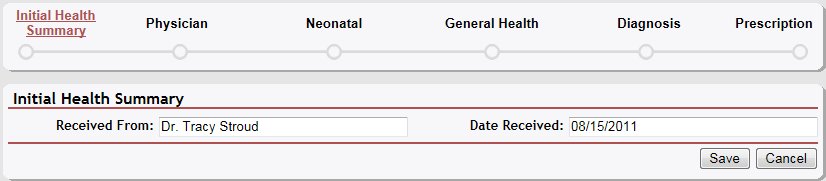
Health page (initial health summary details view)

Health page (initial health summary details view) for Coordinator/District roles

Health page (initial health summary details view) for Provider/State roles
-
View or update the child's health details.
In Received From, enter the name of the person from whom the data was received.
In Date Received, enter the date on which the data was received. For more information about entering dates, see the Calendar Controls topic.
|
NOTE: Asterisks (*) indicate which fields are required on the page. If required information is missing, an error message displays at the top of the page after saving the data. |
-
Click the Save button. The page refreshes and displays the updated information.
Version 1.6