|
NOTE: Depending on the method of access and your current permissions, this tutorial may not be available. |
Use this tutorial to compose a new message for providers on the Provider Communication - Message page.
|
NOTE: Depending on the method of access and your current permissions, this tutorial may not be available. |
Complete the following steps to perform this tutorial:
Display the Provider Communication - Message page.
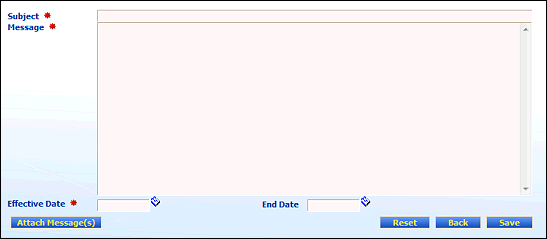
Provider Communication - Message page (default view) for State role

Provider Communication - Message page (default view) for Provider role
Enter the message details.
In Subject, enter the subject of the message. You can enter up to 256 characters in this text box.
In Message, enter the contents of the message. You can enter up to 10,000 characters in this text box.
In Effective Date, enter the date of which the message becomes (or became) effective. For more information about entering dates, see the Calendar Controls topic.
In End Date, enter the date on which the message becomes (or became) inactive. For more information about entering dates, see the Calendar Controls topic.
|
NOTE: Asterisks (*) indicate which fields are required on the page. If required information is missing, an error message displays at the top of the page after saving the data. |
Click Save.
Version 1.6
