Tutorial: Add a Monthly Fee Determination for a Child
Use this tutorial to add a monthly fee determination for a child on the Monthly Fee Determination page.
Complete the following steps to perform this tutorial:
-
Display the Monthly Fee Determination page.

Monthly Fee Determination page (default view)
|
NOTE: This page contains collapsible data. Sections can be collapsed by clicking the [-] beside the section heading. Click the [+] to expand the section. Depending on the method of access and your current permissions, the page displays differently and some information may be disabled or unavailable. |

-
Click the Add button. The page refreshes and displays additional fields for entry.
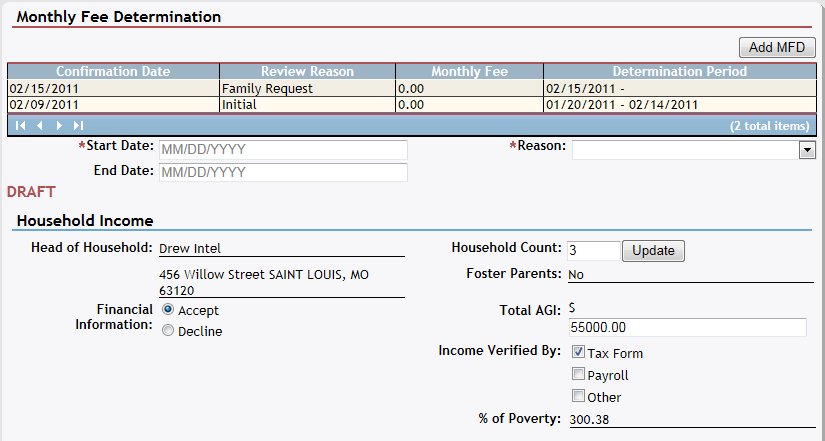
Monthly Fee Determination page (add view)
-
Complete the following information as necessary:
In Start Date, enter the date on which the activity begins. When updating detailed information, the start date may be disabled. For more information about entering dates, see the Calendar Controls topic.
In End Date, enter the date on which the activity is completed. For more information about entering dates, see the Calendar Controls topic.
In Reason, select the reason for the activity from the drop-down list.
In Other, enter any other reason for the action. Up to 50 characters can be entered as necessary. This is only required if Other is selected in Reason.
-
View or update the following information in the Household Income section as necessary:
Head of Household displays the first and last name of the person designated as head of the household.
Address displays the street address, city, two-letter state abbreviation, and zip code.
In Household Count, enter the number of active family members in the household. You can enter numeric values only (greater than or equal to 2).
Click the Update button to display the Family page.
Foster Parents indicates whether any active member of the household has the role of "Foster".
Select the Total AGI radio button to enter financial information. Then enter the household's annual gross income.
Select the Family Declines to Provide Financial Information radio button to indicate that the household has elected to not provide their annual gross income.
In Income Verified by, select one or more of the Tax Form, Payroll, or Other check boxes to indicate the method(s) used to verify the household's financial information. If Other, enter the other method used to verify income.
% of Poverty displays the household's calculated poverty level using the Household Count and Total AGI.
-
View or update the following information in the Insurance section as necessary:
Select one of the following radio buttons to indicate the household's insurance coverage:
Select the Insurance Plan radio button to indicate that the household is covered by an insurance carrier. This radio button is selected by default if an insurance plan is defined on the Health Plans page.
Select the Family Not Insured radio button to indicate that the household is not covered by an insurance carrier. This radio button is disabled if the Insurance Plan radio button is selected.
Select the Family Declines to Provide Insurance Information radio button to indicate that the household has elected not to provide insurance plan information. This radio button is disabled if the Insurance Plan radio button is selected. If this radio button is selected, the fee determination is calculated as the maximum $100.00 per month (unless a household member is actively involved in a Medicaid plan).
If the household is covered by an insurance carrier, view the current carrier information in the table. Detailed information about the carrier displays in the following columns of the table:
Carrier Name displays the insurance carrier's name.
Consent Status displays the plan's current consent status.
The data in these columns of the table is read-only.
|
NOTE: If no results are found, the table displays a single row containing the text: "No Records Found". For more information about tables, see the Tables topic. |
-
If the household is covered by a Medicaid plan, view the current plan information in the Medicaid section. Detailed information about the plan displays in the following columns of the table:
Child Name displays the child's first and last name.
Activated indicates whether the person is currently is Activated.
Status displays the plan's current consent status.
The data in these columns of the table is read-only.
|
NOTE: If no results are found, the table displays a single row containing the text: "No Records Found". For more information about tables, see the Tables topic. |
-
View or update the following information in the Fee Adjustments section as necessary:
In Supplemental Security Income, select one of the radio buttons to indicate whether supplemental security income is available and should be calculated in the fee determination.
In Food Stamps, select one of the radio buttons to indicate whether food stamps are available and should be included in the fee determination.
In Hardship Determination, select a hardship reason from the drop-down list for consideration in the fee determination. If "Set fee to $0.00" is selected, the fee determination is calculated as $0.00. If "Set fee to $5.00" is selected, the fee determination is calculated as $5.00. Other selections do not affect the calculated fee determination.
-
View or update the following information in the Calculated Fee section as necessary:
Select the Calculated Fee radio button to accept the fee determination as calculated by the system.
Click the Calculate button to calculate the monthly fee determination based on the current data.
If the fee has been calculated, view the current fee basis information in the Fee Basis table. Detailed information about the fee basis displays in the following column of the table:
Fee Basis displays the items used to determine the fee amount. The data in this column is read-only.
|
NOTE: If no results are found, the table displays a single row containing the text: "No Records Found". For more information about tables, see the Tables topic. |
Select the Override Calculated Fee radio button to override the fee determination as calculated by the system and enter a new fee determination.
In Override Reason, enter the justification for overriding the calculated fee.
In Override Amount, enter the value that will override the calculated fee. This amount must be greater than or equal to $0.00, and cannot be greater than $100.00.
Select the Family Member Provided False Information check box to indicate that false income information was provided.
In Description, enter additional descriptive information.
In Included Amount, enter a value greater than or equal to $0.00, but not greater than the override amount.
|
NOTE: Asterisks (*) indicate which fields are required on the page. If required information is missing, an error message displays at the top of the page after saving the data. |
-
Click Save (Draft) to save the monthly fee information without confirming it. The page refreshes and displays the new information in the Monthly Fee Determination table.
-
Click Confirm Fee to confirm and save the monthly fee determination. A confirmation message will appear. Select OK or Cancel.
Version 1.6