Tutorial: View a List of My BIBS Kids
Use this tutorial to view and filter the list of child records on the My BIBS Kids page.
|
NOTE: Depending on the method of access and your current permissions, this tutorial may not be available. |

Complete the following steps to perform this tutorial:
-
Display the My BIBS Kids page.
|
NOTE: This page contains collapsible data. Sections can be collapsed by clicking the [-] beside the section heading. Click the [+] to expand the section. |

My BIBS Kids page (default view)

My BIBS Kids page (default view) for District role
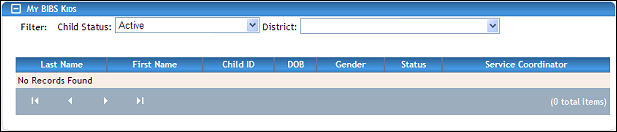
My BIBS Kids page (default view) for State role

My BIBS Kids page (default view) for Coordinator/Provider roles
|
|
NOTE: Select the first filter criteria from the Child Status drop-down list.
Select the second filter criteria from the District drop-down list. The available district descriptions for your state are displayed. No location is selected by default. |
-
View the list of child records in the My BIBS Kids table.
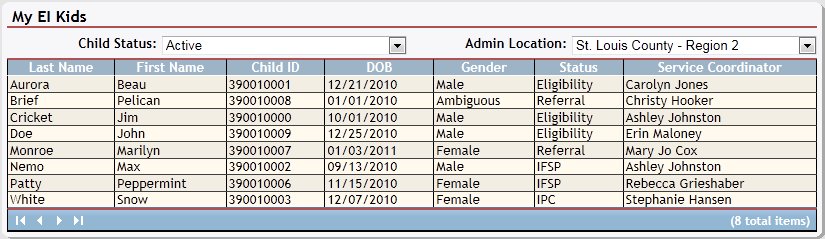
My BIBS Kids page (results found)

My BIBS Kids page (results found)
The table contains a list of all child records applicable for the district selected. Detailed information about the children displays in the following columns of the table:
Last Name displays the person's last name.
First Name displays the person's first name.
Child ID displays the child's unique identification number.
Date of Birth (DOB) displays the month, day, and year on which the person was born.
Gender displays the person's sex.
Status indicates whether the individual is currently active or inactive.
Service Coordinator displays the service coordinator's first and last name.
The data in these columns of the table is read-only.
|
NOTE: If no results are found, the table displays a single row containing the text: "No Records Found". For more information about tables, see the Tables topic. You can double-click on a child record in the table to display the Child Detail page. For more information, see the Tutorial: View or Update Child Details Tutorial: View Child Details tutorial. |
Version 1.6