Tutorial: View a List of Transferred Children Needing Assignment
Use this tutorial to view and filter the list of transferred child records that currently need assignment on the Children Transferred/Needing Assignment page.
|
NOTE: Depending on the method of access and your current permissions, this tutorial may not be available. |

Complete the following steps to perform this tutorial:
-
Display the Children Transferred/Needing Assignment page.

Children Transferred/Needing Assignment page (default view)

Children Transferred/Needing Assignment page (default view) for District role

Children Transferred/Needing Assignment page (default view) for State role
|
NOTE: This page contains collapsible data. Sections can be collapsed by clicking the [-] beside the section heading. Click the [+] to expand the section. |
-
Select the first filter criteria from the Filter drop-down list as necessary. Assignments Needed is selected as the default.
-
Select the second filter criteria from the District drop-down list. The available district descriptions for your state are displayed. No location is selected by default.
-
View the list of child records in the Child Transferred/Needing Assignment table.
-
View the list of child records in the Child Transferred/Needing Assignment table.

Children Transferred/Needing Assignment page (default view)
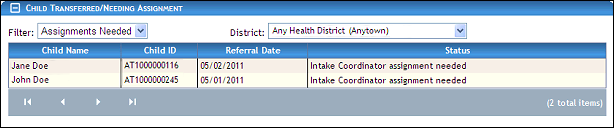
Children Transferred/Needing Assignment page (default view)
The table contains a list of all child records applicable for the district selected. Detailed information about the children displays in the following columns of the table:
Child Name displays the child's first and last name.
Child ID displays the child's unique identification number.
Referral Date displays the date on which the referral was first viewed at the EI location.
Status indicates whether the individual is currently active or inactive.
The data in these columns of the table is read-only.
|
NOTE: If no results are found, the table displays a single row containing the text: "No Records Found". For more information about tables, see the Tables topic. You can double-click on a child record in the table to display the Child Detail page. For more information, see the Tutorial: View or Update Child Details Tutorial: View Child Details tutorial. |
Version 1.6